
This post contains affiliate links. If you sign up for a product through one of these links, we may earn a commission at no extra cost to you. See our Affiliate Disclosure for details.
If you’re comparing the Shopify and WooCommerce cost, the honest answer is: it depends entirely on what “your store” actually looks like. Shopify’s pricing is simple to quote and hard to escape. WooCommerce’s pricing is the opposite — free to start, but the real cost hides in a dozen small decisions you’ll make over your first year. Below is a real breakdown of both, using current 2026 numbers, so you can figure out which one is cheaper for your specific situation — not just which one has the smaller number on its pricing page.
Shopify vs. WooCommerce: The Short Answer
For a brand-new store with modest traffic and a simple product catalog, WooCommerce is usually cheaper in year one — often by a meaningful margin — if you’re comfortable doing your own setup. Shopify tends to win on total cost once you factor in your own time, ongoing maintenance, and the risk of plugin/hosting problems eating into a weekend you didn’t plan to spend troubleshooting. Neither answer holds for every seller, so let’s break down the actual numbers.
Shopify Pricing Plans and Costs in 2026
Shopify bundles hosting, security, and updates into one predictable subscription.
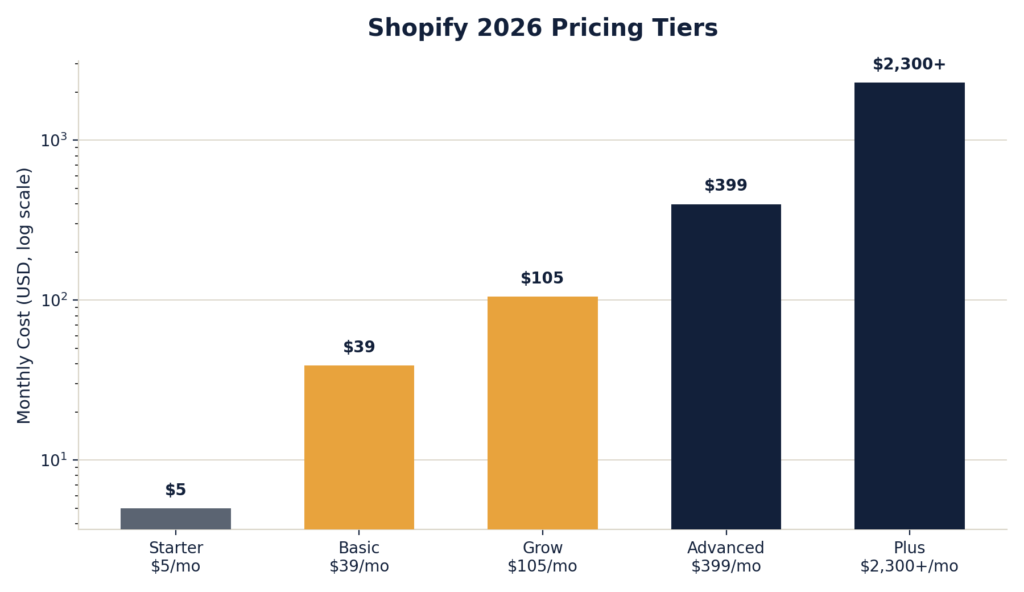
Shopify Plan Costs and Transaction Fees
For a first-time seller, Basic is the realistic starting point. On top of the subscription, you’ll pay payment processing fees — 2.9% + $0.30 per transaction is typical if you use Shopify Payments, Shopify’s built-in processor. If you use a third-party payment gateway instead, Shopify tacks on an additional transaction fee (up to around 2% on lower-tier plans), so most sellers stick with Shopify Payments to avoid double-paying, according to Shopify’s official pricing page.
What’s Included in Every Shopify Plan
Hosting, an SSL certificate, PCI compliance, uptime, and security patching are all bundled in. This is Shopify’s real value proposition: you’re not just paying for software, you’re paying to not have to manage infrastructure.
Realistic first-year cost for a solo seller on Basic: Roughly $350–470/year in subscription costs alone (less if you commit to annual billing), plus processing fees that scale with your sales volume, plus whatever paid apps you add from Shopify’s app store.
WooCommerce Pricing and Hidden Costs in 2026
WooCommerce itself is a free, open-source plugin for WordPress — there’s no license fee and no revenue cut taken by WooCommerce. But “free plugin” doesn’t mean “free store.” You’re assembling the pieces yourself, and each one has its own cost.
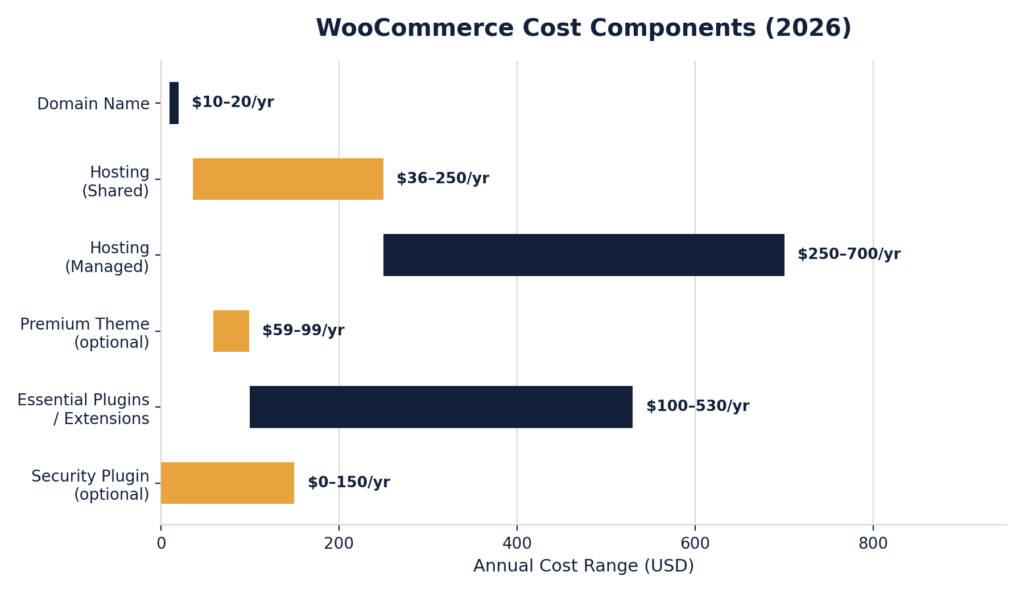
What a Lean WooCommerce Store Actually Costs
Add it up, and a lean, do-it-yourself WooCommerce store typically lands somewhere between $200 and $1,000 in year one, with plenty of sellers landing under $300 if they stick to free themes and only add plugins they genuinely need. Payment processing runs similarly to Shopify — expect around 2.9% + $0.30 per transaction through Stripe or PayPal — but WooCommerce’s official pricing breakdown itself doesn’t add its own transaction fee on top, since there’s no platform taking a cut.
The Catch With WooCommerce’s Low Price Tag
WooCommerce’s low sticker price assumes you’re willing to do the setup work yourself: choosing a host, installing plugins, resolving occasional plugin conflicts, and keeping WordPress core and extensions updated. If you’d rather pay someone else to handle that, freelance WooCommerce setup typically runs $1,500–5,000 as a one-time cost, which changes the math considerably.
Shopify vs. WooCommerce: First-Year Cost Comparison
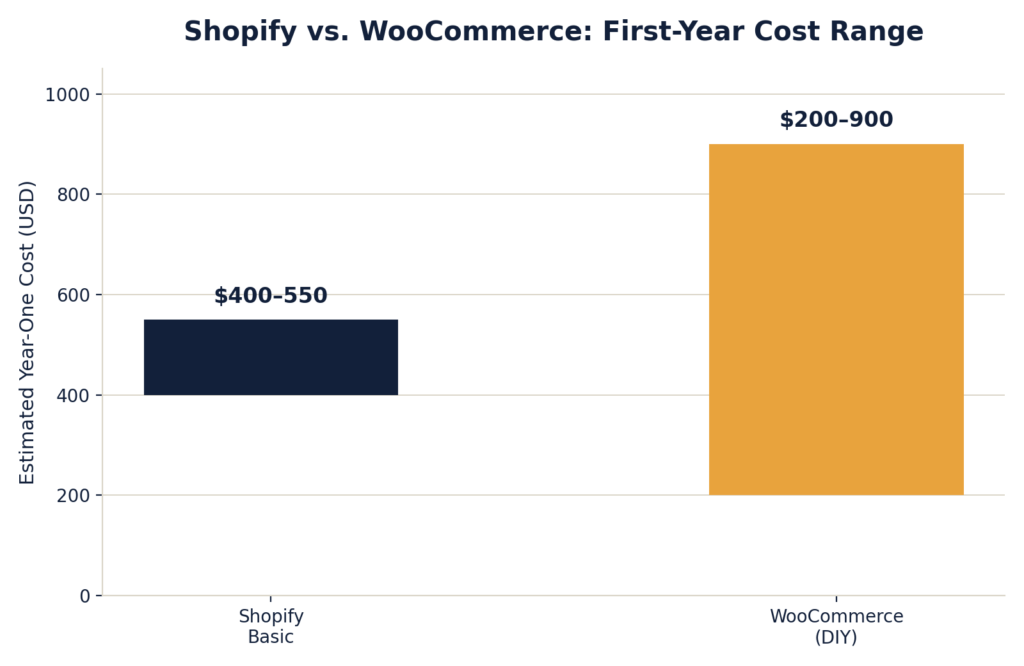
The overlap in that range is the honest takeaway: for a simple store, the two platforms land in a similar ballpark once you actually account for WooCommerce’s “hidden” costs. WooCommerce can be meaningfully cheaper if you keep your plugin stack lean and use budget hosting — but it can also creep past Shopify’s cost if you’re not careful, since every added feature usually means another paid extension.
Price vs. Time: The Real Tradeoff Between Platforms
For sellers weighing this at 5-10 hours a week around another job, the more honest comparison usually isn’t dollars — it’s hours. Shopify’s subscription price is buying you not having to think about hosting, backups, security patches, or plugin conflicts. WooCommerce’s lower price is buying you full control, at the cost of being responsible for keeping all those pieces working together.
When to Choose Shopify vs. WooCommerce
- Choose Shopify if: You want to start selling quickly. You don’t have time to manage technical infrastructure. You’re not confident troubleshooting a broken plugin update at 11pm before a big sales day.
- Choose WooCommerce if: You’re comfortable with WordPress, or willing to learn. You want maximum control over your store’s design and functionality. You’re running a store with unusual requirements that off-the-shelf Shopify apps don’t cleanly support.
Additional Costs to Budget for on Either Platform
Regardless of which platform you pick, a few costs apply either way and are easy to underbudget for:
- Apps and plugins: Both ecosystems have a “death by a thousand $9.99/month subscriptions” problem. Audit your app list every few months.
- Payment processing fees: These scale with revenue on both platforms, and are often the single largest ongoing cost once your store has real sales volume.
- Theme customization: Free themes rarely look finished out of the box. Budget either time or a modest theme purchase.
- Email marketing: Not included in either platform’s base cost. Worth budgeting for from day one.
Bottom Line: Which Platform Is Cheaper for You
If you want the fastest path to a live store with the least amount of technical risk, Shopify’s Basic plan is worth the roughly $30–40/month, especially while you’re still validating your product and don’t want infrastructure problems distracting from that. If you’re comfortable with a bit of technical setup — or you have very specific store requirements — WooCommerce can genuinely be the cheaper option, but only if you stay disciplined about which plugins you actually need.
Neither platform is a mistake. The real question isn’t “which is cheaper” in the abstract — it’s which platform’s cost structure matches how much of your own time you’re willing to trade for lower monthly bills.
Have you run the numbers on your own store? We’d love to hear what your actual first-year costs looked like — reach out at contact@ecomfundingguide.com.