This post contains affiliate links. If you sign up for a product through one of these links, we may earn a commission at no extra cost to you. See our Affiliate Disclosure for details.
Learning how to start an online store comes down to four real decisions: which platform to build on, which software you actually need versus which you don’t, whether AI tools are worth adopting this early, and how you’re going to pay for all of it. Most guides either oversimplify this into a five-minute checklist or bury you in seventy steps that don’t matter yet. This one walks through what genuinely matters at each stage, with real cost ranges and the actual tradeoffs behind each decision.
Key Takeaways
- Platform choice is the decision everything else depends on — it determines your ongoing costs, which apps are available, and even which financing options (like Shopify Capital) you’ll eventually qualify for.
- A realistic lean launch costs $0–$300 in the first month; a fuller setup with a paid theme, several apps, and starting ad spend runs $500–$5,000.
- You need far less software on day one than any “essential tools” list suggests — payments, one email tool, and basic analytics is enough until you have real sales data.
- AI tools are genuinely useful once you’re actually running the store (writing descriptions, answering routine questions) but won’t help you make the harder strategic calls.
- Financing is cheapest when you arrange it before you need it — a line of credit or platform-specific offer secured in advance beats scrambling for capital during a cash crunch.
Jump to a section
Short Answer: How to Start an Online Store
Choose a platform based on your technical comfort and budget — Shopify for the fastest path with the least setup friction, WooCommerce if you’re comfortable with WordPress and want lower long-term costs. Add only the software you need immediately (payments, one email tool, basic analytics), skip AI tools until you have actual daily operations to apply them to, and treat outside financing as something you line up in advance rather than something you reach for once you’re already short on cash.
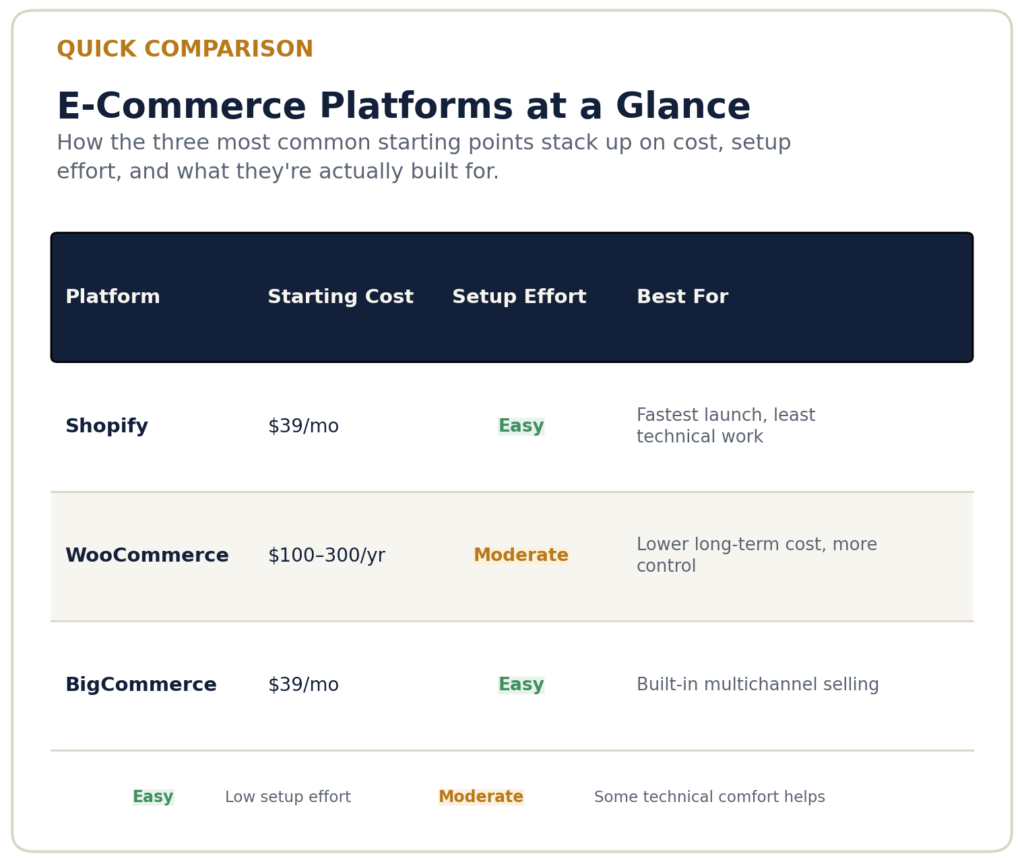
How the three most common starting points stack up on cost, setup effort, and what they’re actually built for.
Choosing Your Platform
Your platform decision shapes every cost and capability that follows. Shopify is the most common starting point for a reason: it bundles hosting, security, and PCI compliance into a flat monthly fee, so you’re not assembling those pieces yourself. Its Basic plan runs around $39/month, and the tradeoff for that convenience is a somewhat smaller degree of design and backend control compared to a self-hosted option.
WooCommerce, by contrast, is a free WordPress plugin — you’re only paying for hosting (typically $5–50/month) and a domain, which puts a lean first year in the realistic $100–300 range. The tradeoff is real too: you’re responsible for your own hosting reliability, security updates, and plugin compatibility, which either costs you time or money to manage properly.
A third path worth naming explicitly: platforms like BigCommerce bundle more multichannel selling (Amazon, eBay, social) natively into lower tiers, which can offset needing as many third-party apps. None of these is objectively the best e-commerce platform for a small business in the abstract — the right one depends on how much you value convenience versus control, and how much technical work you’re realistically willing to take on yourself.
Building Your Software Stack
The instinct when starting out is to install everything — a reviews app, a loyalty app, an upsell app, a popup app — before you’ve made a single sale. Resist it. A new store genuinely needs three things at launch: a working payment processor (usually built into your platform), one email tool to start capturing and emailing your first customers, and basic analytics so you can see what’s actually happening.
Everything else should be added in response to a real, observed need, which is really the whole logic behind building the right software stack for a new online store — sequencing tools to your actual sales volume rather than your ambitions. Inventory management software becomes worth paying for once you’re managing enough SKUs that spreadsheets start causing mistakes — not before. Dedicated accounting software becomes worth it once you have enough transaction volume that manual bookkeeping is eating real hours. Buying these tools speculatively before you have the sales volume to justify them is one of the most common ways new stores overspend in year one.
Where AI Tools Actually Help
AI tools are genuinely useful for a solo seller or small team trying to cover ground that would otherwise require hiring, which is the core idea behind using AI to run a leaner e-commerce business — but they’re a poor fit for the earliest pre-launch decisions, since those require judgment about your specific market that AI doesn’t have access to.
Where AI earns its keep is in the repetitive, high-volume work that comes after launch: generating first-draft product descriptions across a growing catalog, answering the same handful of customer questions (shipping times, return policy, sizing) automatically, and — once you have enough sales history — forecasting which products are likely to sell out. None of this replaces having an actual strategy; it just means you’re not personally typing out the fortieth nearly-identical product description by hand.
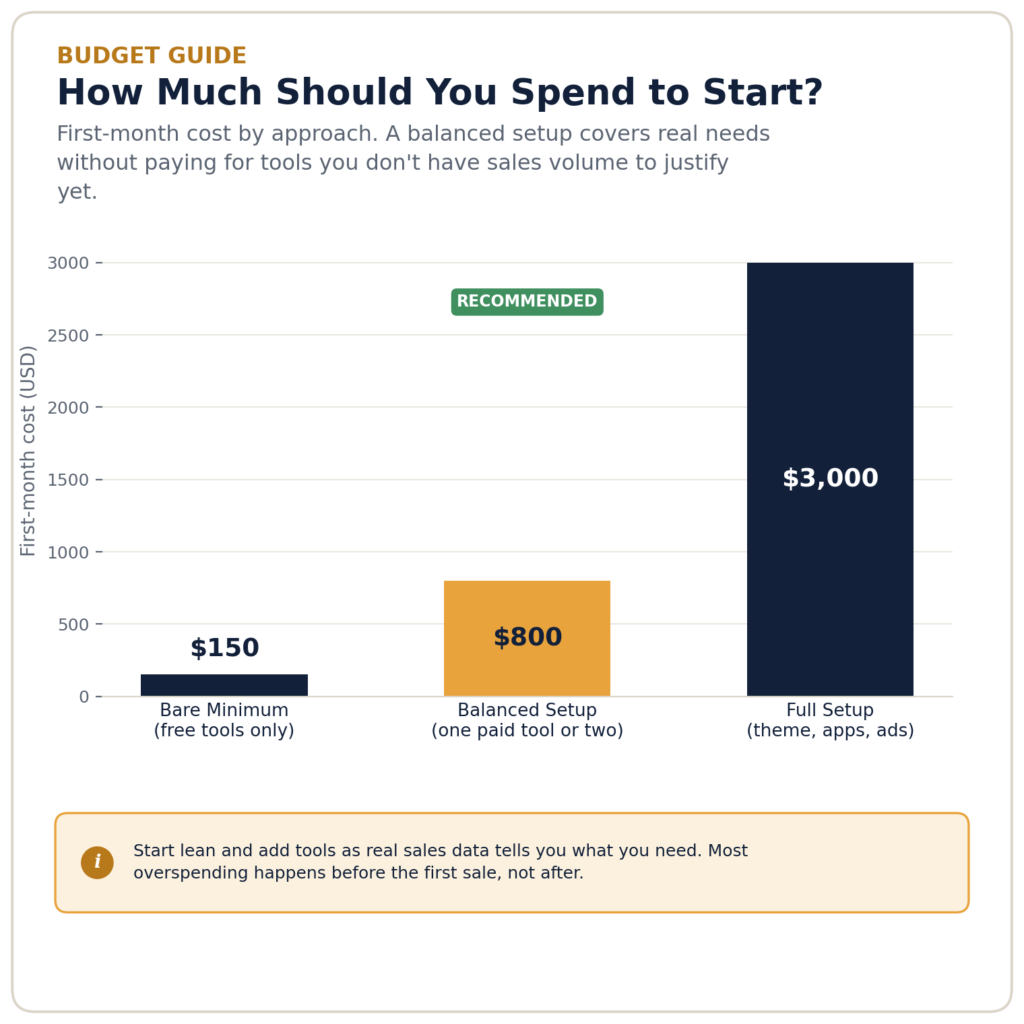
First-month cost by approach. A balanced setup covers real needs without paying for tools you don’t have sales volume to justify yet.
Financing: What to Line Up and When
Most new stores don’t need outside financing to launch — personal savings, a small initial budget, or a model like print-on-demand that doesn’t require upfront inventory spend covers a genuinely large share of new sellers, which is worth mapping against a realistic budget breakdown for starting an online store before assuming you need financing at all. Financing becomes relevant once you’re buying inventory in real volume, or once you can see a growth opportunity (a big wholesale order, a seasonal spike) that outpaces your current cash on hand. Learning your financing is the first step toward learning how to start an online store.
The cost of capital varies enormously by source and by how prepared you are when you apply. A revolving line of credit arranged while your finances look good will always be cheaper than emergency financing sought during a cash crunch, since lenders price risk into every offer — and a business that looks desperate gets priced accordingly. If you’re weighing a line of credit against other options, the short version is that a line of credit suits ongoing, variable needs, while a one-time loan or inventory-specific financing suits a single, sized purchase.
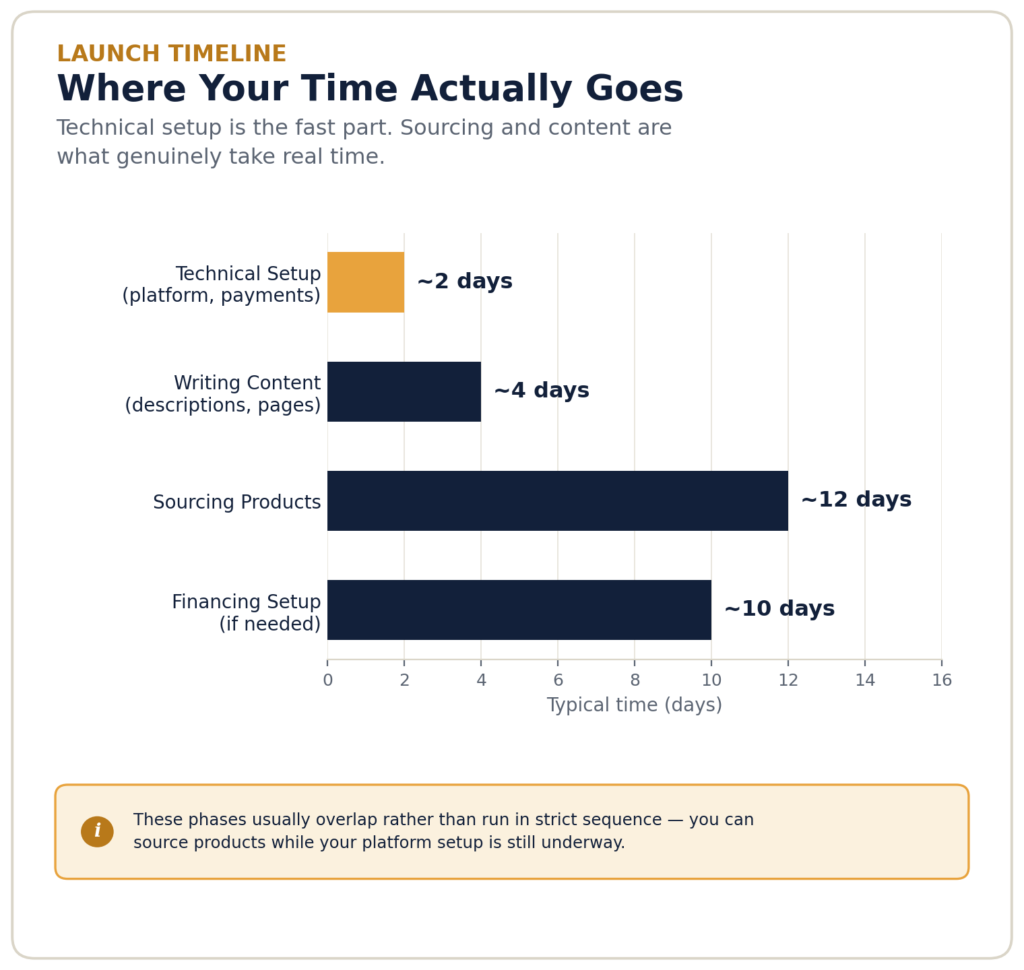
Technical setup is the fast part. Sourcing and content are what genuinely take real time.
Frequently Asked Questions
How Long Does It Take to Start an Online Store?
The technical setup — choosing a platform, adding products, connecting payments — can happen in a day or two. What actually takes time is sourcing products, writing real product content, and setting up software and financing properly. A properly set-up launch, not just a technically live storefront, realistically takes a few weeks.
Do I Need Outside Funding to Start an Online Store?
No, in most cases. Many sellers start with personal savings, especially on WooCommerce or with models like print-on-demand and dropshipping that don’t require upfront inventory investment. Outside financing becomes more relevant once you’re buying inventory in bulk or funding growth you can already see coming.
Which E-Commerce Platform Is Best for a Beginner Starting an Online Store?
There’s no universal answer — it depends on your technical comfort and budget. Shopify is generally the fastest path with the least setup friction; WooCommerce offers lower long-term costs if you’re comfortable with (or willing to learn) basic WordPress management.
How Much Does It Really Cost to Start an Online Store?
Costs range from close to $0 using free platform tiers and no paid apps, up to several thousand dollars once inventory, a paid theme, marketing spend, and software subscriptions are factored in. Most new sellers underestimate ongoing costs — software subscriptions and ad spend — far more than they underestimate one-time setup costs.
Bottom Line: Starting and Funding Your Online Store
Bottom Line
There’s no single right way to start an online store — the right platform, software stack, and financing approach depend on your specific budget, technical comfort, and how much of the work you want to do yourself versus pay someone else to handle. Get the platform decision right first, since it shapes everything after it, add software only in response to a real need rather than speculatively, and treat financing as something you arrange ahead of time rather than a rescue plan.
Starting your own online store and hitting a decision this guide didn’t cover? Email us at contact@ecomfundingguide.com — we read every message.
This article is for informational purposes only. Costs, platform features, and financing terms change over time — confirm current details directly with each provider before making a decision.
How We Put This Guide Together
Pricing figures are checked directly against each platform’s own site rather than copied from older roundups, and cost ranges reflect what’s covered in depth across our other platform, software, and financing guides. We weighed:
This article is for informational purposes only. Costs, platform features, and financing terms change over time — confirm current details directly with each provider before making a decision.